 29.09.2026, 00:20
 Sprache ändern
 Registrieren
 Anmelden
Du bist nicht angemeldet.





 nightlust
Junior Member




You will need to have the USB Page added to your Aquaero in order for this to work properly.
You will also need to download a copy of LCDHype: Download Here!
WinAMP:
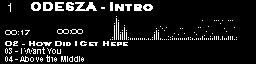
You will need: Plugins
Place the WinAMP plugin in the WinAMP plugins directory.
Enable the Winamp Data Collector Plugin Visualization
Place the Aquero LCDHype plugin in the LCDHype plugins directory.
5.1 VU Meter:
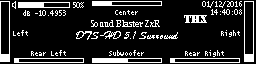
You will need: Plugins
You will need: LCDHype Plugins
Place the Aquero LCDHype plugin in the LCDHype plugins directory.Place the VU meter plugin in the LCDHype plugins directory.
AC3 Style VU Meter:

You will need: Plugins
You will need: LCDHype Plugins
Place the Aquero LCDHype plugin in the LCDHype plugins directory.Place the VU meter plugin in the LCDHype plugins directory.
Enjoy!!!
You will also need to download a copy of LCDHype: Download Here!
WinAMP:
You will need: Plugins
Place the WinAMP plugin in the WinAMP plugins directory.
Enable the Winamp Data Collector Plugin Visualization
Place the Aquero LCDHype plugin in the LCDHype plugins directory.

|
Quellcode |
1 2 3 4 5 6 7 8 9 10 11 12 13 14 |
ID=//ScreenDefTitle=WinAMP info with VUSpecCharFile=#Header
%Common.SetPriority(200)%LCD.Gfx_SetTextArea(0,0,256,64)
#EndHeader#GfxMode
%LCD.Gfx_SetOverlayMode()%If(%WinAmp.Status() = -1) Then {%Common.ChangeScreen(0,3)}/SpecAnalyzer/%WinAmp.SpecAnalyzer(FFT, PeakedBars, 64, 25, 5, 9, 2, 1, 1, 110, 15)
/TrackNo/%Common.CreateNewLine()%LCD.Gfx_SetFont('Copperplate Gothic Light',10,1,0)%Format.Offset(Horizontal, 5) %Format.Offset(Vertical,-14)%Inc(%WinAmp.TrackNo(),1)''%WinAmp.CountTracks()
/RawTitle/%Common.CreateNewLine()%LCD.Gfx_SetFont('Copperplate Gothic Bold',10,1,Bold)%Format.Offset(Horizontal,30)%Format.Offset(Vertical,-16)%Param.EnableScrolling(Horizontal,Swing,1,235,1)%WinAmp.RawTitle()
/TrackPos/%LCD.Gfx_SetFont('Copperplate Gothic Light',6,1,0)%Common.CreateNewLine()%Format.Offset(Horizontal,5)%Format.Offset(Vertical,14)%Format.Time(%Mul(%WinAmp.TrackPos(),1000),'mm:ss')''/TrackLength/%Common.CreateNewLine()%LCD.Gfx_SetFont('Copperplate Gothic Light',6,1,0)%Format.Offset(Horizontal,57)%Format.Offset(Vertical,-10)%Format.Time(%Mul(%WinAmp.TrackLength(),1000),'mm:ss')
/StatusBar/%Format.Bar(Horizontal,235,2,0,%WinAmp.TrackLength(),%WinAmp.TrackPos(),1,0,11,32)
/Playlist next 3 title/
%Common.CreateNewLine()%LCD.Gfx_SetFont('Copperplate Gothic Light',6,1,Bold)%Format.Offset(Horizontal,5)%Format.Offset(Vertical,3)%Param.EnableScrolling(Horizontal,Swing,1,235,1)%WinAmp.RawTitle(%Inc(%WinAmp.TrackNo(), 1))
%Common.CreateNewLine()%LCD.Gfx_SetFont('Arial',6,1,Bold)%Format.Offset(Horizontal,5)%Format.Offset(Vertical,-2)%Param.EnableScrolling(Horizontal,Swing,1,235,1)%WinAmp.RawTitle(%Inc(%WinAmp.TrackNo(), 2))
%Common.CreateNewLine()%LCD.Gfx_SetFont('Arial',6,1,Bold)%Format.Offset(Horizontal,5)%Format.Offset(Vertical,-2)%Param.EnableScrolling(Horizontal,Swing,1,235,1)%WinAmp.RawTitle(%Inc(%WinAmp.TrackNo(), 3))
#EndGfxMode
//EndDef
|
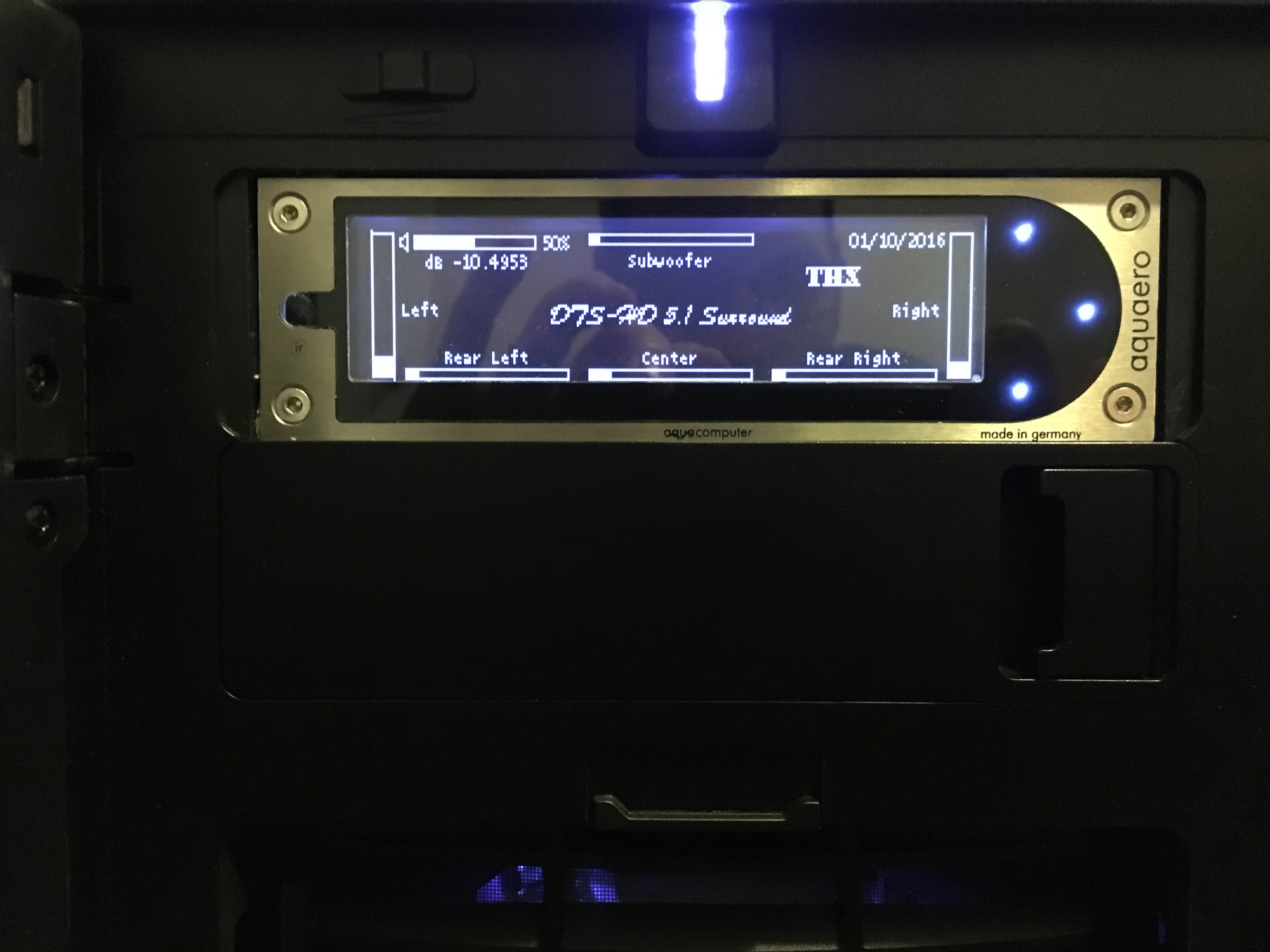
5.1 VU Meter:
You will need: Plugins
You will need: LCDHype Plugins
Place the Aquero LCDHype plugin in the LCDHype plugins directory.Place the VU meter plugin in the LCDHype plugins directory.
|
|
Quellcode |
1 2 3 4 |
ID=//ScreenDefTitle=System SoundSpecCharFile=#Header%Graph.SetTextArea(0,0,256,64)%Graph.SetRefreshArea(0, 0, 256, 64)%Param.RenderMode(Full)%Common.SetPriority(200)%Graph.SetPixel(12,3,1)%Graph.SetPixel(12,4,1)%Graph.SetPixel(12,5,1)%Graph.SetPixel(12,6,1)%Graph.SetPixel(13,3,1)%Graph.SetPixel(13,6,1)%Graph.SetPixel(14,2,1)%Graph.SetPixel(14,7,1)%Graph.SetPixel(15,1,1)%Graph.SetPixel(15,2,1)%Graph.SetPixel(15,3,1)%Graph.SetPixel(15,4,1)%Graph.SetPixel(15,5,1)%Graph.SetPixel(15,6,1)%Graph.SetPixel(15,7,1)%Graph.SetPixel(15,8,1)#EndHeader
#GfxMode
%If( %System.Input(GetCode) = 8 )Then { %Common.ChangeScreen(0,Next) }%Graph.Font('Lucida Console', 5, 1)%Format.Bar(Vertical, 10, 61, 0, 550000, %Plugin.VolumePeakmeter.GetPeakChannel(1), 1, 0, 0, 1)/Left/%Format.Bar(Vertical, 10, 61, 0, 550000, %Plugin.VolumePeakmeter.GetPeakChannel(2), 1, 0, 244, 1)/Right//%Format.Bar(Horizontal, 150, 5, 0, 50, %Plugin.VolumePeakmeter.GetVolumeStepInfo('Step'), 1, 0, 5, 37)//VolumeStep (51 Steps on my RTL Sound Chip)/%Format.Bar(Horizontal, 52, 6, 0, 1000000, %Plugin.VolumePeakmeter.GetVolumeMasterLevelScalar(), 1, 0, 18, 2)/VolumeLevelScalar/%Format.Bar(Horizontal, 70, 5, 0, 550000, %Plugin.VolumePeakmeter.GetPeakChannel(5), 1, 0, 14, 58)/BackLeft/%Format.Bar(Horizontal, 70, 5, 0, 550000, %Plugin.VolumePeakmeter.GetPeakChannel(6), 1, 0, 170, 58)/BackRight/%Format.Bar(Horizontal, 70, 5, 0, 550000, %Plugin.VolumePeakmeter.GetPeakChannel(3), 1, 0, 92, 1)/Center/%Format.Bar(Horizontal, 70, 5, 0, 550000, %Plugin.VolumePeakmeter.GetPeakChannel(4), 1, 0, 92, 58)/Sub/%Common.CreateNewLine(1,72,2)%Round(%Div(%Plugin.VolumePeakmeter.GetVolumeMasterLevelScalar(),10000))'%'%Common.CreateNewLine(1,22,10)'dB '%Trunc(%Div(%Plugin.VolumePeakmeter.GetVolumeMasterLevel(),1000000),4)%Common.CreateNewLine(1,90,18)%Graph.Font('Cambria', 7, 1)'Sound Blaster ZxR'%Common.CreateNewLine(1,76,28)%Graph.Font('Brush Script MT', 9, 1,)'DTS-HD 5.1 Surround'%Common.CreateNewLine(1,184,12)%Graph.Font('Stencil', 9, 1,)'THX'%Graph.Font('Lucida Console', 5, 1)%Common.CreateNewLine(1,12,30)'Left'%Common.CreateNewLine(1,220,30)'Right'%Common.CreateNewLine(1,30,50)'Rear Left'%Common.CreateNewLine(1,184,50)'Rear Right'%Common.CreateNewLine(1,114,9)'Center'%Common.CreateNewLine(1,108,50)'Subwoofer'%Common.CreateNewLine(1,210,10)/'CPU '%System.CPU(Usage)' %'/%Common.CreateNewLine(1,202,1)%System.GetDateTime('mm/dd/yyyy')%If( %Plugin.VolumePeakmeter.GetMute() = 1 ) Then{%Graph.SetPixel(197,2,1)%Graph.SetPixel(196,3,1)%Graph.SetPixel(194,4,1)%Graph.SetPixel(193,5,1)%Graph.SetPixel(191,6,1)%Graph.SetPixel(190,7,1)} Else{%Graph.SetPixel(197,2,0)%Graph.SetPixel(196,3,0)%Graph.SetPixel(194,4,0)%Graph.SetPixel(193,5,0)%Graph.SetPixel(191,6,0)%Graph.SetPixel(190,7,0)}#EndGfxMode
//EndDef
|
AC3 Style VU Meter:
You will need: Plugins
You will need: LCDHype Plugins
Place the Aquero LCDHype plugin in the LCDHype plugins directory.Place the VU meter plugin in the LCDHype plugins directory.
|
|
Quellcode |
1 2 3 4 |
ID=//ScreenDefTitle=AC3 StyleSpecCharFile=#Header%Graph.SetTextArea(0,0,256,64)%Graph.SetRefreshArea(0, 0, 256, 64)%Param.RenderMode(Full)%Common.SetPriority(100)%Graph.SetPixel(92,3,1)%Graph.SetPixel(92,4,1)%Graph.SetPixel(92,5,1)%Graph.SetPixel(92,6,1)%Graph.SetPixel(93,3,1)%Graph.SetPixel(93,6,1)%Graph.SetPixel(94,2,1)%Graph.SetPixel(94,7,1)%Graph.SetPixel(95,1,1)%Graph.SetPixel(95,2,1)%Graph.SetPixel(95,3,1)%Graph.SetPixel(95,4,1)%Graph.SetPixel(95,5,1)%Graph.SetPixel(95,6,1)%Graph.SetPixel(95,7,1)%Graph.SetPixel(95,8,1)#EndHeader
#GfxMode
%If( %System.Input(GetCode) = 8 )Then { %Common.ChangeScreen(0,Next) }%Graph.Font('Lucida Console', 5, 1)%Format.Bar(Vertical, 10, 51, 0, 500000, %Plugin.VolumePeakmeter.GetPeakChannel(1), 1, 0, 0, 1)/Left/%Format.Bar(Vertical, 10, 51, 0, 500000, %Plugin.VolumePeakmeter.GetPeakChannel(2), 1, 0, 10, 1)/Right//%Format.Bar(Vertical, 150, 5, 0, 50, %Plugin.VolumePeakmeter.GetVolumeStepInfo('Step'), 1, 0, 5, 37)//VolumeStep (51 Steps on my RTL Sound Chip)/%Format.Bar(Horizontal, 52, 6, 0, 1000000, %Plugin.VolumePeakmeter.GetVolumeMasterLevelScalar(), 1, 0, 100, 2)/VolumeLevelScalar/%Format.Bar(Vertical, 10, 51, 0, 500000, %Plugin.VolumePeakmeter.GetPeakChannel(5), 1, 0, 20, 1)/BackLeft/%Format.Bar(Vertical, 10, 51, 0, 500000, %Plugin.VolumePeakmeter.GetPeakChannel(6), 1, 0, 30, 1)/BackRight/%Format.Bar(Vertical, 10, 51, 0, 500000, %Plugin.VolumePeakmeter.GetPeakChannel(3), 1, 0, 40, 1)/Center/%Format.Bar(Vertical, 10, 51, 0, 500000, %Plugin.VolumePeakmeter.GetPeakChannel(4), 1, 0, 50, 1)/Sub/%Common.CreateNewLine(1,154,2)%Round(%Div(%Plugin.VolumePeakmeter.GetVolumeMasterLevelScalar(),10000))' %'%Common.CreateNewLine(1,104,10)'dB '%Trunc(%Div(%Plugin.VolumePeakmeter.GetVolumeMasterLevel(),1000000),4)%Common.CreateNewLine(1,88,28)%Graph.Font('Brush Script MT', 9, 1,)'DTS-HD 5.1 Surround'%Common.CreateNewLine(1,228,52)%Graph.Font('Stencil', 9, 1,)'THX'%Graph.Font('Lucida Console', 5, 1)%Common.CreateNewLine(1,2,54)'L'%Common.CreateNewLine(1,12,54)'R'%Common.CreateNewLine(1,21,54)'RL'%Common.CreateNewLine(1,31,54)'RR'%Common.CreateNewLine(1,42,54)'C'%Common.CreateNewLine(1,50,54)'SW'%Common.CreateNewLine(1,210,10)/'CPU '%System.CPU(Usage)' %'/%Common.CreateNewLine(1,212,1)%System.GetDateTime('mm/dd/yyyy')%If( %Plugin.VolumePeakmeter.GetMute() = 1 ) Then{%Graph.SetPixel(197,2,1)%Graph.SetPixel(196,3,1)%Graph.SetPixel(194,4,1)%Graph.SetPixel(193,5,1)%Graph.SetPixel(191,6,1)%Graph.SetPixel(190,7,1)} Else{%Graph.SetPixel(197,2,0)%Graph.SetPixel(196,3,0)%Graph.SetPixel(194,4,0)%Graph.SetPixel(193,5,0)%Graph.SetPixel(191,6,0)%Graph.SetPixel(190,7,0)}#EndGfxMode
//EndDef
|
Enjoy!!!
Dieser Beitrag wurde bereits 9 mal editiert, zuletzt von »nightlust« (13. Januar 2016, 01:43)
----
Nightlust
Nightlust


Ähnliche Themen
-
 English forum »
-
 A5 LCDHype Winamp plugin script and help, please
(5. Juni 2013, 23:40)
A5 LCDHype Winamp plugin script and help, please
(5. Juni 2013, 23:40)
-
- English forum »
-
Aquabus and LCD screen layout
(1. April 2013, 16:40)
-
- Wasserkühlung »
-
aquasuite 2012 Beta und Firmware 1024 für aquaero 5 - Beta 15
(20. Mai 2011, 18:26)
-
- Überwachung und Steuerung »
-
Aquaero 5: Display Freiprogrammierbar?
(4. Juni 2012, 15:52)
-
- Überwachung und Steuerung »
-
Frage zu jaLCDs
(18. Januar 2012, 22:33)
-