• 27.06.2026, 06:31
  • S’inscrire
  • Connexion
  • Vous n’êtes pas connecté.


Bonjour, visiteur, bienvenue sur les forums Aqua Computer Forum. Si c’est votre première visite, nous vous invitons à consulter l’Aide. Elle vous expliquera le fonctionnement de cette page. Pour avoir accès à toutes les fonctionnalités, vous devez vous inscrire. Pour cela, veuillez utiliser le formulaire d’enregistrement, ou bien lisez plus d’informations sur la procédure d’enregistrement. Si vous êtes déjà enregistré, veuillez vous connecter.

NHJ

Newbie

Need help/advice with my current setup

mardi 2 juin 2026, 17:30

I am not particular familiar with all the jargon & how everything communicates within my setup.
So, I would be grateful if anyone who is willing to pass on any advice, would bare this in mind when explaining tips/help.
Here is my configuration:-
1. OCTO
2. ULTITUBE D5 - Reservoir
3. D5 NEXT - Pump
4. Cuplex Kryos NEXT - CPU Block
5. BeQuiet - Fans

On the OLED controller of the D5 NEXT Pump, it is giving me:-
1. No Water Temperature reading.
2 I am running the pump RPM too low.
3. The FANS aren't running at the right speed, Too low,

I have tried to use AI to guide me through the issues. It basically informed me that due to my configuration with OCTO, it is not reading the situation right.
I am inclined to believe that the A.I is wrong, as I have also had a warning from my BIOS that there is a fan issue, but I can hear the fans on at a good speed & ALL are running fine.
In desperation I have 'Factory Reset' the pump, which seemed to generate more issues/warnings than it had initially, which was originally ONLY the Fan speed warning.
Any step-by-step help to just get a basic setup in place, would be greatly appreciated.
Thank you.

Jacob

Full Member

mercredi 3 juin 2026, 08:49

1. Ensure the OCTO and D5 NEXT are correctly connected to the PC's USB 2.0 port.

2. Install Aquasuite software.

3. Allow the BIOS to control the case fans, such as CPU Fan, OptiFan, and Water Pump, by setting reference temperature sensors for them. The motherboard has preset temperature sensors that can be used. Set all fans to PWM mode, especially the case fans.

4. Control the radiator fans and D5 NEXT using Aquasuite software. I installed Aquaero as a terminal controller, using four Calitemp temperature sensors at the inlet and outlet of the CPU and GPU water blocks to control the fans and pump.

5. Aquasuite software can also pick up motherboard temperature signals or signals from third-party software as control signal sources.

Good luck! :)

Shoggy

Sven - Admin

mercredi 3 juin 2026, 09:09

On the OLED controller of the D5 NEXT Pump, it is giving me:-
1. No Water Temperature reading.
2 I am running the pump RPM too low.

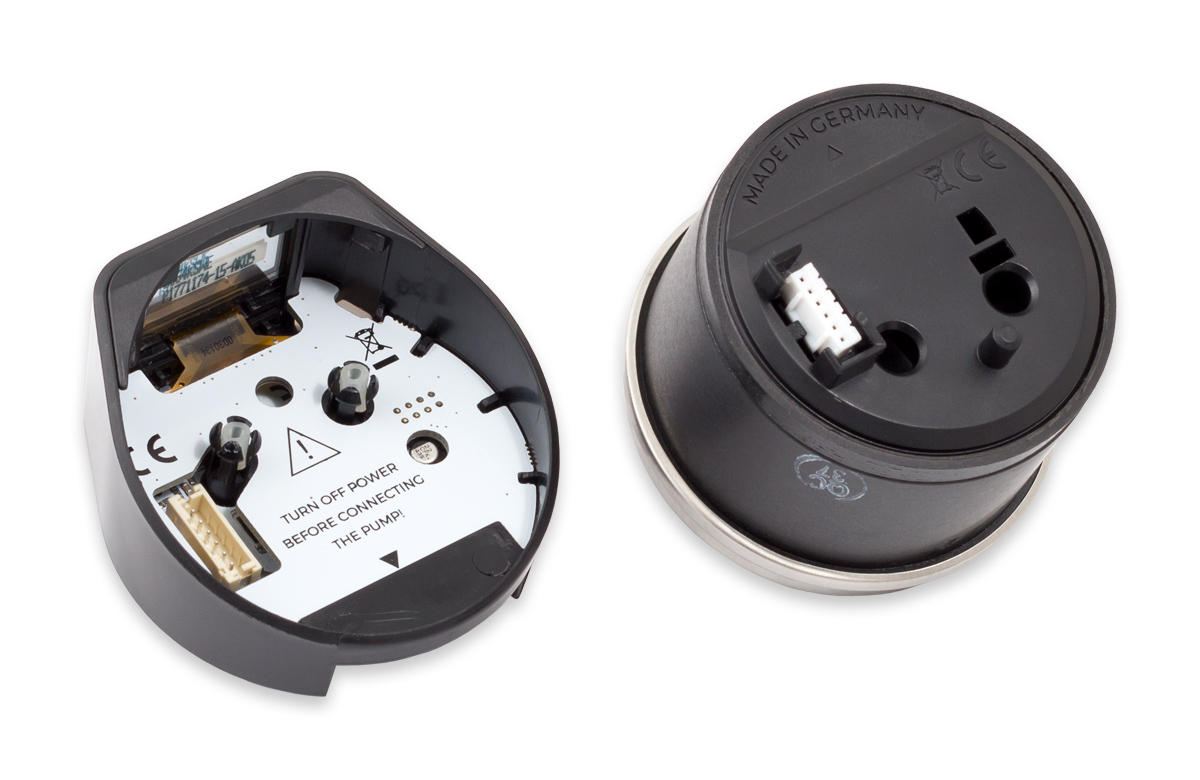
Sounds a lot like as if there is a problem with the connection between pump motor and controller unit. Please try reconnecting the control unit. While doing so, check the white interface connector on both units for anything supicious. One possible problem could be that the connector has been pushed into the pump housing, or that the connector on the control unit has come loose.

It should look like that:

NHJ

Newbie

jeudi 4 juin 2026, 22:17

Thanks for the replies, I have opened up the pump and found nothing suspicious at all. No bent pins, no burn marks etc, everything looks like new. I have taken the connections to the pump out, the SATA power cable,also the one that connects to the motherboard & the other which connects to the OCTO. Then reconnected them to make sure they are not loose.
I have checked all the firmware has been updated, also took the gasket off the top of the reservoir and switched the PC back on to makes sure the pump was working, which it was, as there was an intake of water & a number of bubbles which started to diminish in time, then I put the gasket back on.
I have checked my radiator fans are running, which they are. Everything seems to be running fine no issues, just no 'water Temp' reading.
The following other 2 warnings:-
1. 'No Flow' reading warning due to the fact I am not using the correct coolant solution which has to be a certain viscosity, otherwise you get no reading from it, so that's sorted.
2. 'Fan Low RPM' warning, as it was a reading for the PWM fan header(on the PUMP) which has 'nothing' connected to it, so that's also sorted.

Any other ideas, what could be the reason for the no 'Water Temp'?
Thanks, again for your help it is appreciated. I have also been getting into using Aquasuite a lot more and have created a sensor for my radiator water temp(which I have a physical sensor attached to the radiator) and use that as a source to regulate the fans & pump speed. Also, Gauges for CPU Temp, GPU Temps etc.

NHJ

Newbie

samedi 6 juin 2026, 23:47

Found out why I am not getting a Water Temp reading, it is due to the connection to the motherboard is a USB 3.1 and I have an adapter attached to make it USB 2.0(which I have the OCTO connected too, aswell). This is causing an issue with information being read. I don't know why companies make technology which doesn't comply with one another, due to issues like this.
Does anyone know of a cable you can buy which creates a work around for this kind of issue? As I have spent some time looking for a remedy, with no positive results.

Shoggy

Sven - Admin

jeudi 11 juin 2026, 16:18

Your water temperature reading problem has nothing to do with the USB port. If you can see the pump in the software, then the USB connection is already working correctly.

It is more likely that the sensor inside the pump motor is somehow faulty.