• 03.01.2026, 07:53
  • Registrieren
  • Anmelden
  • Sie sind nicht angemeldet.


Spikadelia

Junior Member

Splitty/Octo/Farbwerk/BeQuiet Confusion

Sonntag, 14. Dezember 2025, 18:44

A few years ago I attempted and failed using RGB in a build. I am on a new build and need some advice. 

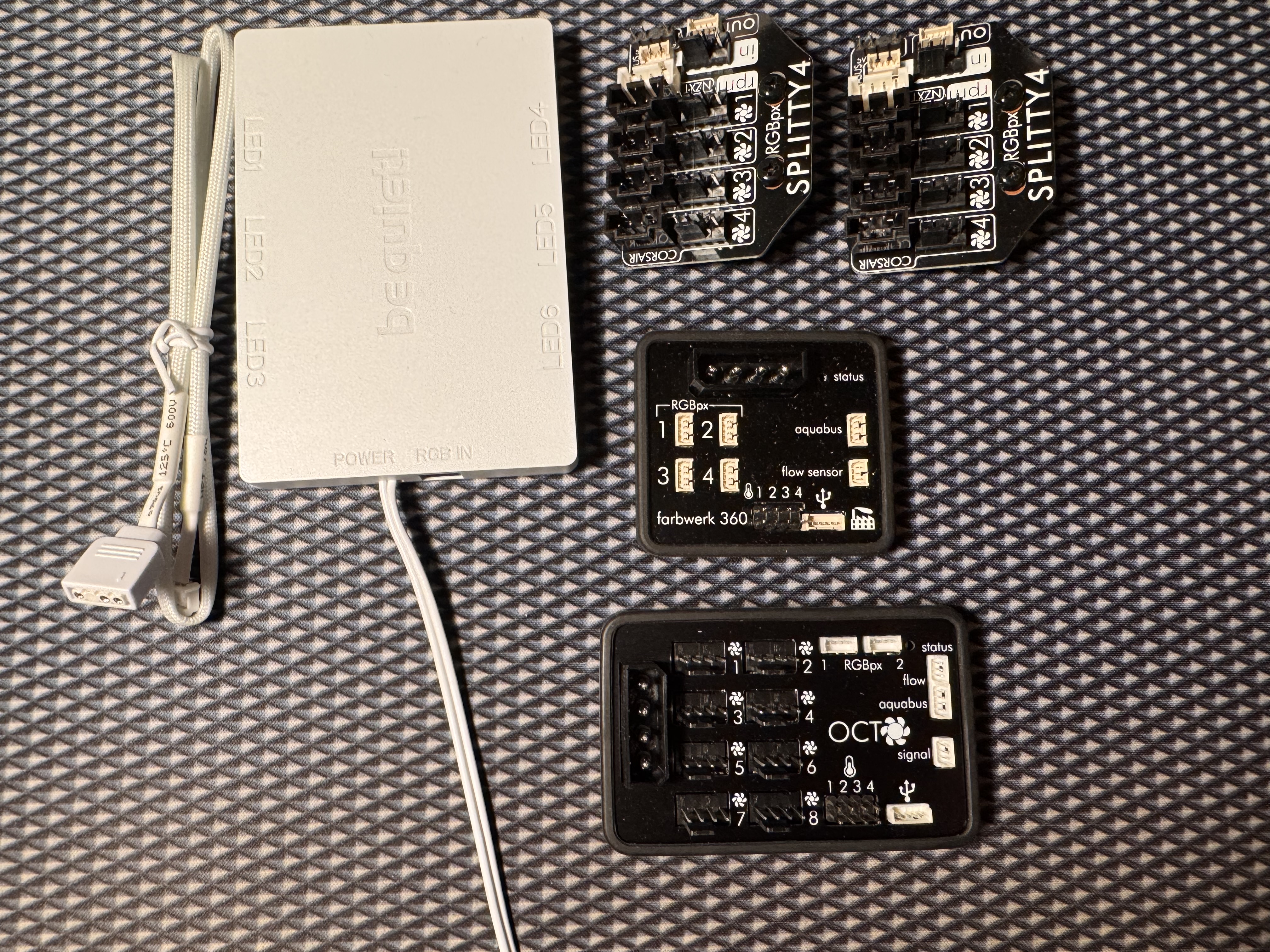
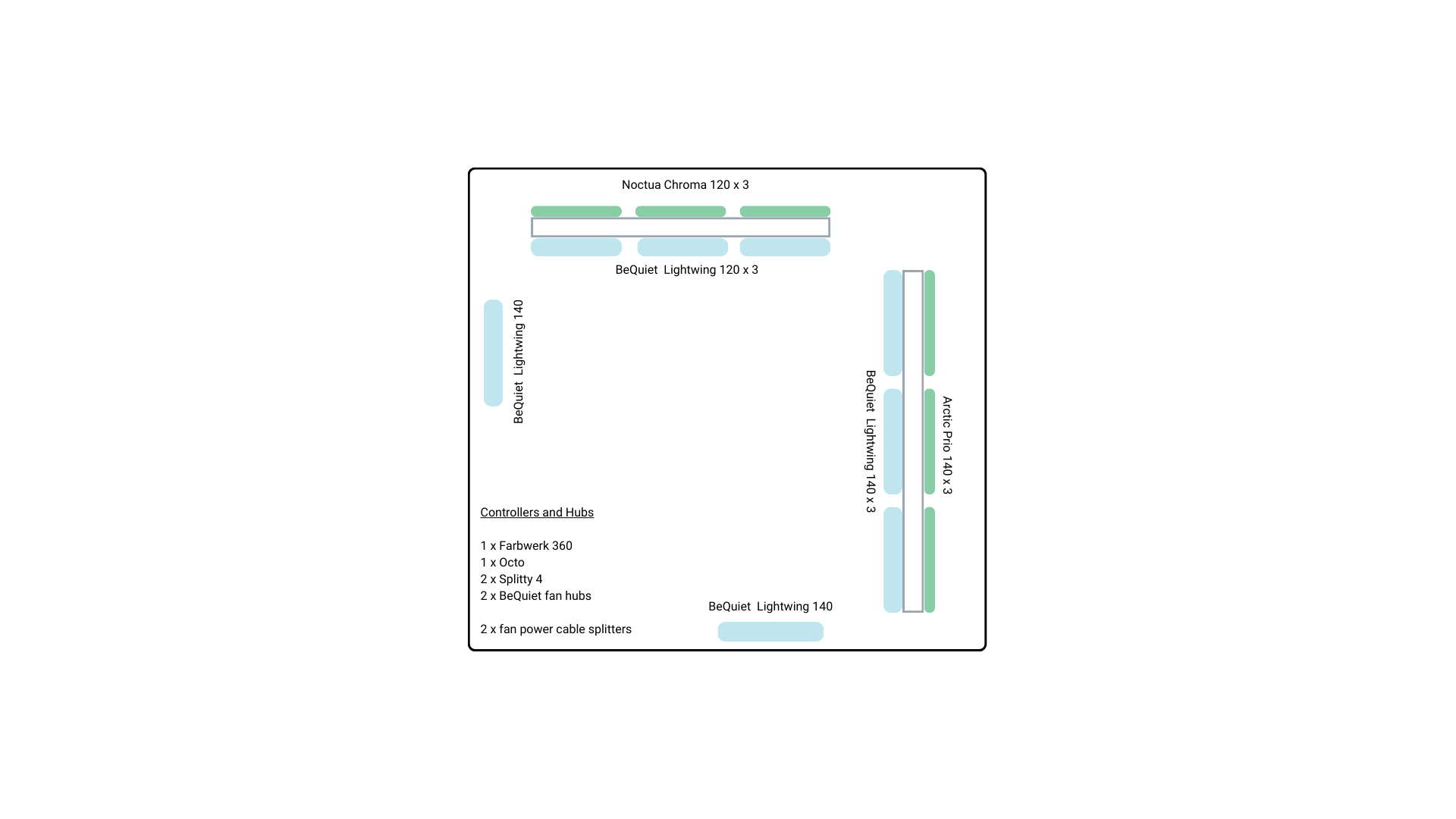
Just as reference the first picture shows the layout of the 14 fans in the case, the second is the BeQuiet hub and my other controllers for reference. The 8 LightWings have RGB. The 6 fans positioned on the outside of radiators have no RGB. I would like to control everything through Aquasuite.

Here is the kit I have:

5 x 140mm and 3 x 120mm BeQuiet Lightwings (18 LED per fan)
(6 x non RGB fans on outside of the radiators)

2 x BeQuiet fan hubs
Farbwerk 360
2 x Splitty 4’s.
Aquacomputer Octo
2 x 4-way PWM fan power splitters (for the non-RGB fans)

I realise that I probably have more than enough controllers and from my forum reading I think the Farbwerk will give me more detailed control of the RGB lighting.

I am pretty sure I will need some adaptors between the output of the BeQuiet fan hubs and the proprietary interface of the Aquacomputer controllers. (RGBpx adapter for components with motherboard header Product no.: 53282).

In advance thanks for any help given.


Remayz

Senior Member

Sonntag, 14. Dezember 2025, 19:36

Since the Light wings have RGB daisy chain you don't need RGB splitters or the bequiet hubs, but only the octo, and if you want better RGB the Farbwerk360.
Each RGBPX channel can control up to 90 leds so that's up to 5 daisy chained fans per channel.

You can use the splitty 4 to convert the RGBPX connector to regular RGB and plug the light wings into.
It'll also be used as fan splitter for cooling, like maybe putting one splitty per radiator with 3 lightwings fans (2 radiators = 2 PWM channels) and two fans on their own for the bottom and back ones. Or you can plug them on the same splitty after all and just use 2 channels for those 8 fans.

For the Noctuas, you'll just need 3 fan PWM splitter cables for each, direct to the Octo.

Spikadelia

Junior Member

Sonntag, 14. Dezember 2025, 21:39

Hi Remayz,

Thanks for our advice, would you mind if I sent you a PM with a diagram of how I will connect everything so you can double-check it?

Thanks

Spike

Speedy-VI

Senior Member

Montag, 15. Dezember 2025, 00:24

That Farbwerk360 in your photo must be an older one. A few years ago they rearranged the 4 x RGBpx port headers in a row and added the standard DRGB 4-pin male headers above the RGBpx port headers. I bought mine in 2021 so its been at least that long since they updated it. The attached product photo is the current version of the Farbwerk360. I would use the RGBpx port headers, cables, and adapters anyway because the standard DRGB 4-pin connectors suck so much. I read one problem is that there is no real standard for the diameter of the pins and the sockets, so a female DRGB connector from brand A may not mate properly with the male pins on a cable or device from Brand B. EK even makes a Velcro strap called the EK-Loop CMS to prevent mating pairs of DRGB connectors from falling apart. I have used the Aquacomputer #53282 and #53285 adapters and they mated quite snugly with the DRGB connectors I was using. Whether they will mate snugly with the DRGB connectors on your Be Quit fans is anybody's guess.

Tip - Adafruit product ID #4924 1.25mm Pitch 4-pin Cable 20cm long 1:N Cable - Molex PicoBlade uses the same Molex Picoblade connectors as the Aquacomputer RGBpx cables. They also have mating pairs to bare ends, Product ID #4722. Both are 95-cents each. I think they only have them in 20cm length and I think they are pinned the same way. Standard Picoblade cables are wired "mirrored" so pin-1 to pin-4, pin-2, to pin-3, pin-3 to pin-2, pin-4 to pin-1. RGBpx cables are wired 1:1 so pin-1 to pin-1, pin-2 to pin-2, pin-3 to pin-3, pin-4 to pin-4. The Adafruit cables are also wired 1:1. For Aquacomputer RGBpx cables, Red is +5VDC, Black is GND, White is Data In, and Green is Data Out. RGBpx port header pinout is shown in the 3rd picture. Hope this helps!

Remayz

Senior Member

Montag, 15. Dezember 2025, 00:32

Hi Remayz,

Thanks for our advice, would you mind if I sent you a PM with a diagram of how I will connect everything so you can double-check it?

Thanks

Spike
Oh just post it here, i don't come to the forum too often ^^ and others can contribute as well. this one is not complicated.
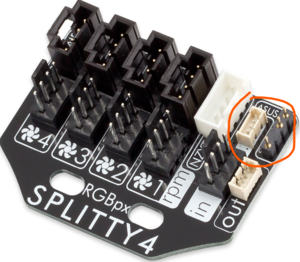
Also Speedy, AC makes that adapter already https://shop.aquacomputer.de/Monitoring-…ader::3829.html
works with any rgbpx extension, and there's loads in the shop of all sizes.
But for here, the splitty4 already have the rgbpx connection, and the strandard ARGB plug to connect the first Lightwing in the chain.

Spikadelia

Junior Member

Montag, 15. Dezember 2025, 20:24

Hi All,

Just continuing the dialogue so I can get across the line, so obviously the point is twofold: to provide power for the fans and manage their power curves and then control the RGB components. For power I was going to use the Splitty's and Octo and use my Farbwerk for the RGB (yes my Farbwerk is an old model that I ended up not using in my failed build).

Power for the 14 fans as follows:
Front Radiator
3 x Arctic P14 slims: daisy-chained to Octo channel 1 (non RGB)
3 x LightWings: use Spltty 4 (#1) to Octo channel 2

Top Radiator
3 x Noctua chroma: 3 way power splitter to Octo Channel 3
3 x Lightwings: use Splitty 4 (#2) to Octo Channel 4

Intake fans
2 x Lightwings (reverse) to Octo Channel 5 and 6

RGB Control
4 x Lightwings daisy chained into Farbwerk channel 1
4 x Lightwings daisy chained into Farbwerk channel 2
For this I will need 2 x RGBpx adapter (part 53282)

Octo: USB connected to header on motherboard, molex power supply
Farbwerk: USB connected to header on motherboard, molex power supply

Am I getting close to an understanding? Thanks for pointers to an RGB noob. :D

Remayz

Senior Member

Dienstag, 16. Dezember 2025, 00:33

you're good so far.
But you already have something for RGB on both Splitty 4 :


That basically does the job of the little pin adapter, so you already have everything if you still have some RGBPX cables around